
- Mail Address info@velnustech.com
- Phone Number +91-90990-05498

Contact Info
- C-1024, Siddhivinayak Tower, Kataria Automobile Road Makarba, Ahmedabad - 380051
- +91 90990 05498
- info@velnustech.com
- Week Days: 09.00 to 18.00 Sunday: Closed
AI Agents Explained: 11 Powerful Uses, Benefits & How They Work in 2026
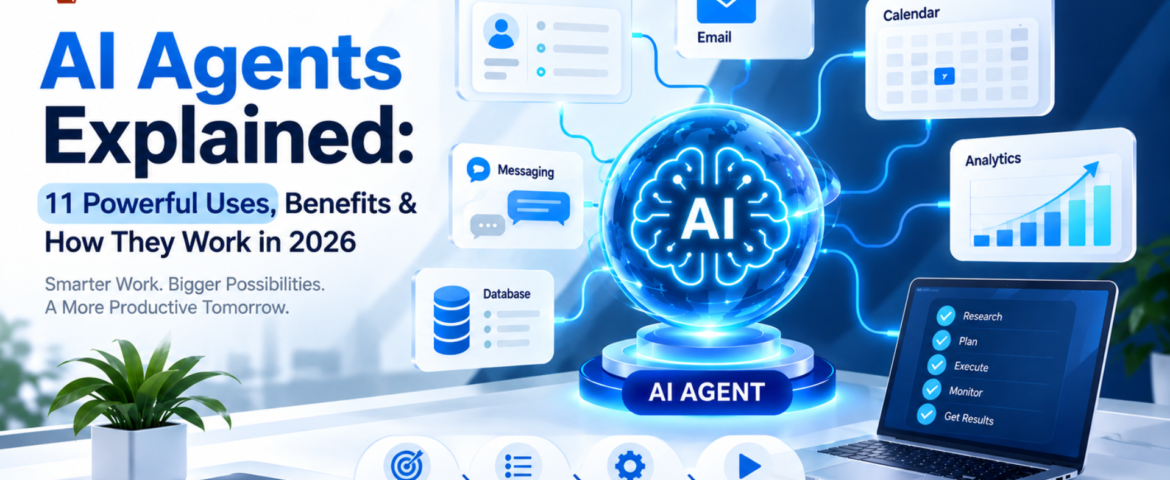
An AI agent is a software system that can understand a goal, decide what steps are needed, use connected tools, and take actions to complete a task with limited human intervention.
Unlike a traditional chatbot that mainly responds to questions, an AI agent can work through a multi-step workflow. Depending on its design and permissions, it can retrieve information, update a CRM, create tasks, send messages, search approved sources, prepare reports, and hand complicated situations to a human.
In simple terms:
A chatbot mainly talks. An AI agent can understand, decide, use tools, and act.
For a freelancer, that could mean turning a new client inquiry into a project brief and follow-up task. For a small business, it could mean qualifying leads, updating a CRM, answering customer questions, and escalating unusual cases.
This guide explains what AI agents are, how they work, what they can do, how they differ from chatbots and traditional automation, how much they cost, their limitations, and how beginners can start using them.
What Is an AI Agent?
An AI agent is an AI-powered software system designed to pursue a goal and complete a workflow rather than simply generate a single response.
A practical AI agent generally combines:
- An AI model
- Instructions
- Tools or integrations
- Relevant knowledge or context
- Workflow logic
- Guardrails and permissions
- Human oversight when necessary
OpenAI describes agents as systems that can independently accomplish tasks on a user’s behalf, use tools to interact with external systems, and operate within defined instructions and guardrails. Google Cloud similarly describes modern agents in terms of capabilities such as reasoning, planning, memory, and action.
A simple example
Imagine telling an AI agent:
“Find today’s new leads, identify which ones are high priority, update the CRM, prepare personalized follow-ups, and create reminders for leads that need another contact.”
A basic chatbot might explain how you could perform those steps.
An appropriately configured AI agent can potentially perform the workflow itself by:
- Reading the new leads
- Checking relevant information
- Classifying the leads
- Updating the CRM
- Preparing or sending an approved message
- Creating a follow-up task
- Escalating anything that falls outside its instructions
The important difference is that an agent is designed around completing work, not simply producing text.
How Does an AI Agent Work?
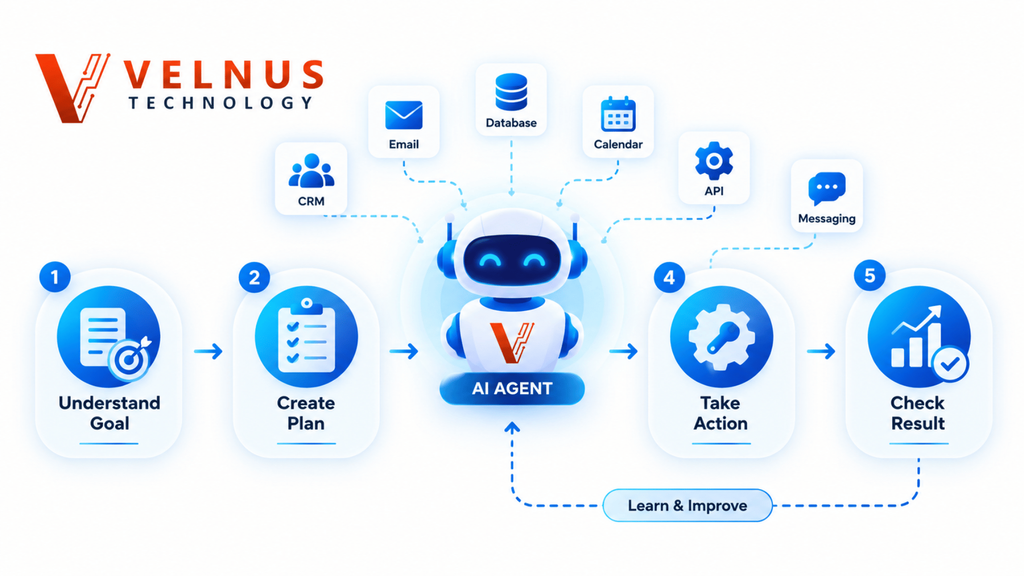
The easiest way to understand an AI agent is to think of it as a digital worker operating within a defined set of rules.
A typical workflow looks like this:
Goal → Understand → Plan → Use Tools → Take Action → Check Result → Complete or Escalate
Let’s break that down.
1. The AI Agent Understands the Goal
The user or business provides an objective.
For example:
“Follow up with customers who haven’t replied for seven days.”
The agent needs to understand what the desired result is and what information it needs before taking action.
A clear goal is important because vague instructions can produce inconsistent results.
2. It Determines the Required Steps
Instead of immediately generating an answer, an agent can determine the sequence of actions required to reach the goal.
For the follow-up example, it might need to:
- Find customer records
- Check the last communication
- Identify customers who have not replied
- Review relevant customer information
- Prepare an appropriate message
- Decide whether approval is required
- Send or queue the message
- Record the activity
The exact process depends on the agent’s instructions, tools, and permissions.
3. It Uses Tools
Tools are one of the most important differences between a simple conversational AI application and an agent designed to perform work.
An agent may connect to tools such as:
- CRM systems
- APIs
- Databases
- Email platforms
- Calendars
- Business software
- Documents
- Knowledge bases
- Messaging platforms
- Search systems
Tools allow an agent to retrieve information and, where permitted, take actions in external systems. OpenAI’s agent guidance describes data tools for retrieving context and action tools for changing systems or performing actions such as updating CRM records or sending messages.
4. It Takes an Action
After determining what needs to happen, the agent can perform an approved action.
For example, it might:
- Update a CRM record
- Create a task
- Draft an email
- Send a notification
- Create an appointment
- Retrieve a document
- Route a support request
- Prepare a report
Not every action should happen automatically.
Sensitive or irreversible actions may require human approval.
5. It Checks the Result
A reliable agent should not simply assume that every action worked.
It can check whether:
- The API responded successfully
- The CRM was updated
- Required information was missing
- The workflow encountered an error
- The task should be escalated
If something falls outside its instructions, the safest behavior may be to stop and request human intervention.
This is why testing, monitoring, permissions, and guardrails are important when deploying AI agents.
What Are the Main Components of an AI Agent?
Most practical AI agents can be understood through several building blocks.
| Component | What it does |
|---|---|
| AI Model | Understands information and supports reasoning or decision-making |
| Instructions | Defines what the agent should do and how it should behave |
| Tools | Connects the agent to external systems |
| Knowledge | Provides relevant business information and context |
| Memory | Helps maintain useful context when the system supports it |
| Guardrails | Restricts unsafe, unauthorized, or unwanted behavior |
| Orchestration | Controls how tasks, tools, and agents work together |
A simple way to remember this is:
Model = brain
Tools = hands
Knowledge = reference material
Instructions = operating procedure
Guardrails = boundaries
OpenAI identifies the model, tools, and instructions as fundamental components of an agent, while more complex systems can add orchestration and multiple specialized agents.
AI Agent vs Chatbot: What’s the Difference?
This is one of the most common questions beginners ask.
| Feature | Traditional Chatbot | AI Agent |
|---|---|---|
| Answers questions | Yes | Yes |
| Understands natural language | Yes | Yes |
| Performs multi-step tasks | Limited | Yes |
| Uses external tools | Sometimes | Common |
| Retrieves information | Sometimes | Yes, when connected |
| Makes bounded decisions | Limited | Yes |
| Takes actions | Limited | Yes, when permitted |
| Works toward a goal | Usually limited | Yes |
| Operates with less supervision | Limited | More capable |
Example: “Where is my order?”
A traditional chatbot might:
- Ask for the order number
- Retrieve the order status
- Tell the customer where the package is
An AI agent could potentially:
- Identify the customer
- Retrieve the order
- Check shipment information
- Review relevant account information
- Determine whether the shipment is delayed
- Create a support ticket if necessary
- Notify the customer
- Escalate unusual cases
The difference is not simply that one uses AI and the other doesn’t.
The bigger difference is workflow execution.
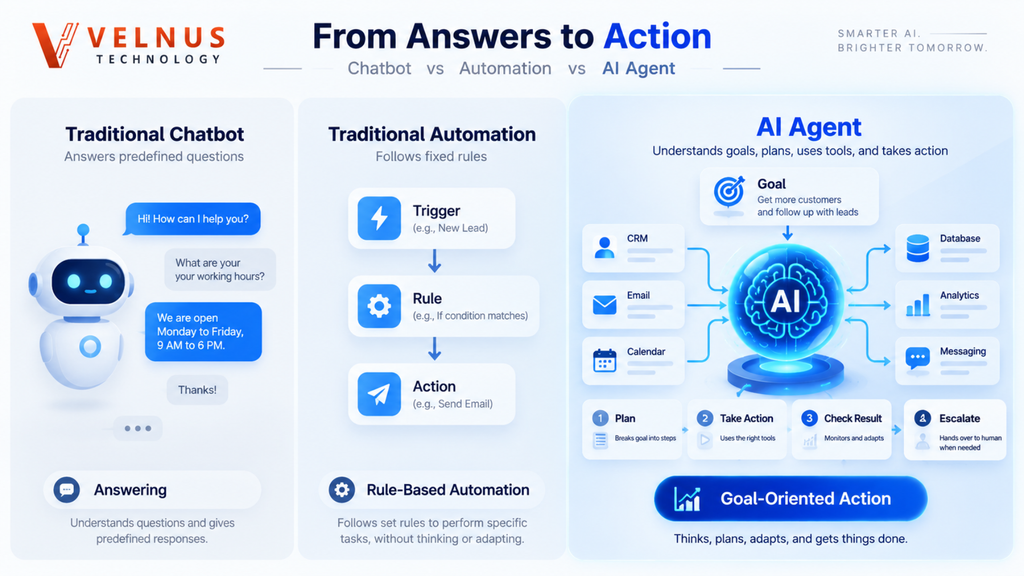
AI Agent vs Traditional Automation
AI agents are also different from traditional rule-based automation.
Traditional automation
A conventional workflow might look like:
Trigger → Rule → Action
For example:
New form submission → Add contact to CRM → Send predefined email
The path is generally predetermined.
AI agent
An agent-based workflow can look more like:
Goal → Interpret context → Decide next step → Select tool → Act → Check result
For example:
New lead → Understand inquiry → Check CRM → Determine lead type → Choose appropriate action → Update CRM → Prepare follow-up → Escalate if needed
Traditional automation is often better when the process is completely predictable.
An AI agent becomes more useful when the workflow involves unstructured information, changing context, tool selection, or bounded decisions. OpenAI’s guidance specifically recommends checking whether a deterministic solution is sufficient before choosing an agent.
11 Powerful AI Agent Use Cases for Businesses
AI agents can be useful in many areas, but the strongest opportunities are usually repetitive workflows that consume time and have a measurable outcome.
1. Lead Qualification
An AI agent can collect information about incoming leads, classify them, update a CRM, and prepare the next follow-up action.
Example:
New lead → Qualification → CRM update → Personalized follow-up → Reminder
This can reduce repetitive sales administration.
2. Customer Support
An AI agent can help answer common questions, retrieve customer information, classify support requests, and route complicated issues to a human.
For example:
Customer question → Identify intent → Retrieve information → Respond → Escalate if necessary
This can be particularly useful when customers contact a business outside normal working hours.
3. Email Management
An agent can help:
- Identify important emails
- Summarize conversations
- Extract tasks
- Draft replies
- Create follow-up reminders
- Organize information
Human review can remain in place for sensitive or important communications.
4. Appointment Scheduling
When connected to an approved calendar, an AI agent can help:
- Check availability
- Suggest suitable time slots
- Collect required information
- Create appointments
- Send reminders
The exact actions depend on the calendar integration and permissions.
5. CRM Updates
Instead of manually entering every interaction, an agent can potentially:
- Read customer information
- Update lead status
- Add notes
- Create tasks
- Record interactions
- Trigger follow-up workflows
This is particularly useful for sales and support teams.
6. Report Generation
An agent can gather approved information from multiple systems and prepare a recurring report.
For example:
Collect data → Analyze information → Identify changes → Prepare report → Send for review
This can save time spent manually copying information between systems.
7. Document Processing
AI agents can help process business documents by:
- Extracting information
- Classifying documents
- Finding relevant sections
- Summarizing content
- Creating structured records
- Routing documents for review
Human verification remains important when documents contain sensitive or high-impact information.
8. Marketing Workflows
Marketing teams can use agents for tasks such as:
- Research
- Content briefs
- Keyword clustering
- Campaign organization
- Content outlines
- Lead follow-ups
- Reporting
The human should still verify important claims, brand messaging, and final published content.
9. Internal Knowledge Search
An agent connected to approved company information can help employees find:
- Policies
- Procedures
- Product information
- Internal documentation
- Frequently asked questions
- Project information
Instead of searching through multiple documents manually, employees can ask questions in natural language.
10. Task and Project Coordination
An agent can help organize work by:
- Extracting tasks from conversations
- Creating task lists
- Updating statuses
- Preparing summaries
- Identifying overdue items
- Creating reminders
This can reduce repetitive coordination work.
11. Data Collection and Workflow Coordination
AI agents can gather information from approved sources, organize it, and move it through a predefined workflow.
For example:
Collect information → Validate required fields → Organize data → Update system → Notify responsible person
This is especially useful when employees currently perform the same coordination steps repeatedly.
AI Agent Example: From New Lead to Follow-Up
Consider a small business that receives leads from a website.
Without an agent, the process might look like:
Lead arrives → Employee checks form → Employee opens CRM → Employee reviews lead → Employee writes message → Employee updates CRM → Employee creates reminder
With an appropriately configured agent:
Lead arrives → Agent reads lead → Checks CRM → Classifies lead → Updates CRM → Creates personalized follow-up → Creates reminder → Escalates when necessary
For example, the agent might be instructed:
“When a new lead arrives, check whether the lead already exists in the CRM. Identify the requested service, classify the lead based on the approved criteria, update the CRM, prepare a personalized follow-up, and create a task for the sales representative. Do not change pricing or issue commitments without approval.”
This is a much better way to think about AI agents than simply asking:
“What can AI automate?”
The better question is:
“Which workflow can an AI agent safely handle from beginning to end?”
How Can Freelancers Use AI Agents?
Freelancers often lose time switching between tools, checking messages, organizing information, and following up with clients.
An AI agent can help connect these repetitive parts of the workflow.
Example: Freelance Marketer
A workflow could look like:
New client inquiry → Collect requirements → Create project brief → Prepare proposal → Create follow-up reminder
Example: Freelance Developer
An agent could help:
- Organize bug reports
- Summarize documentation
- Search approved project information
- Create development tasks
- Prepare release notes
Example: Designer
An agent could help:
- Organize client feedback
- Extract requirements
- Create task lists
- Summarize revision requests
- Prepare project updates
The goal isn’t to remove the freelancer from the process.
The goal is to spend less time on repetitive coordination and more time on skilled work.
How Do You Create an AI Agent?
You don’t always need to begin with a complicated technical system.
A practical approach is to start with one narrow workflow.
Step 1: Choose One Problem
Don’t start with:
“I want an AI agent for my entire business.”
Start with:
“I want to automate lead follow-ups.”
A narrow problem is easier to test and measure.
Step 2: Define the Goal
Write down the result you want.
For example:
“Identify qualified leads and prepare a personalized follow-up within 10 minutes of receiving the lead.”
A measurable goal makes it easier to evaluate whether the agent is actually helping.
Step 3: Identify the Required Tools
Decide what the agent needs access to.
Possible tools include:
- CRM
- Messaging platform
- Google Sheets
- Calendar
- Business knowledge base
- Database
- Internal documents
Only connect tools that the workflow actually needs.
Step 4: Define Permissions
This is one of the most important steps.
Decide what the agent can do automatically and what requires approval.
The agent can potentially do automatically:
- Read lead information
- Categorize leads
- Draft messages
- Update lead status
- Create internal tasks
Human approval may be required for:
- Sensitive customer communication
- Pricing changes
- Refunds
- Deleting records
- Financial actions
- High-impact decisions
The principle is simple:
Give an agent enough access to be useful, but not more access than it needs.
Step 5: Test Real Scenarios
Don’t test only perfect examples.
Test situations such as:
- Missing information
- Unexpected questions
- Incorrect data
- API failures
- Duplicate records
- Unclear customer requests
- Sensitive actions
OpenAI recommends testing agents with realistic examples, including messy situations and ambiguity, then refining instructions and guardrails based on what happens.
Step 6: Measure the Result
Track whether the agent actually improves the workflow.
Useful measurements include:
- Time saved
- Task completion rate
- Error rate
- Human escalation rate
- Cost per completed task
- Response time
- Customer satisfaction
Don’t automate a workflow simply because it looks impressive.
Automate it because it produces a measurable improvement.
How Much Does an AI Agent Cost?
There is no single price for an AI agent.
The cost can range from a relatively simple no-code workflow to a complex system involving custom development, multiple APIs, infrastructure, monitoring, security, and human approval.
Your total cost can depend on:
- AI model usage
- Number of tasks
- API calls
- Integrations
- Data storage
- Automation platform
- Development
- Security requirements
- Monitoring
- Human review
A useful way to evaluate the investment is to calculate:
Cost per completed task
and compare it with:
Manual time + software costs + operational overhead
A simple workflow may be inexpensive, while a high-volume system with many integrations can require considerably more infrastructure and maintenance.
Are AI Agents Safe to Use?
AI agents can be useful, but they should not be treated as completely independent digital employees with unlimited access.
An agent can misunderstand information, make an incorrect decision, encounter a tool failure, or take an action that was not intended.
That’s why businesses should consider:
- Limited permissions
- Human approval
- Clear instructions
- Authentication
- Access controls
- Audit logs
- Testing
- Monitoring
- Defined escalation rules
- Tool-specific safeguards
OpenAI recommends layered guardrails, access controls, and human intervention for sensitive or high-risk actions.
A simple example
An agent might be allowed to:
Draft a refund response
but not:
Automatically issue the refund
That small difference can significantly reduce operational risk.
What Are the Limitations of AI Agents?
AI agents are powerful, but they are not magic.
Incorrect Decisions
An AI model can misunderstand information or reach an incorrect conclusion.
Tool Failures
A CRM, API, database, or other connected system may become unavailable.
Security Risks
Giving an agent unnecessary permissions can increase the potential impact of mistakes or misuse.
Cost
Complex workflows involving frequent model calls and external APIs can become expensive.
Unpredictability
Unlike purely deterministic software, AI agents can make context-dependent decisions.
Maintenance
Agents need testing and monitoring when business processes, APIs, tools, or information sources change.
For these reasons, the best strategy is usually:
Automate within clear boundaries instead of trying to automate everything.
When Should You Use an AI Agent?
An AI agent is a strong candidate when a workflow is:
- Repetitive
- Multi-step
- Based on changing or unstructured information
- Connected to business tools
- Time-consuming
- Easy to evaluate
- Suitable for bounded decision-making
For a simple, completely predictable task, traditional automation may be a better choice.
For example:
If the rule is always “When X happens, do Y,” traditional automation may be enough.
But if the workflow requires:
“Understand X, check several pieces of information, decide which path applies, use the appropriate tool, and escalate unusual cases,”
an AI agent may be more suitable.
Are AI Agents the Future of Business Automation?
AI agents are becoming an important direction in business automation because they can combine language understanding, reasoning, tools, and actions within a workflow.
The important shift is not simply:
“AI can answer questions.”
It is:
“AI can increasingly participate in the workflow itself.”
A traditional workflow might look like:
Human → Software → Human → Software → Human
An agent-based workflow can potentially become:
Human → AI Agent → Approved Tools → Completed Workflow
The human does not disappear from the process.
Instead, the agent handles appropriate repetitive coordination while people remain responsible for important decisions.
What Is Agentic AI?
Agentic AI refers broadly to AI systems designed to pursue goals by using capabilities such as reasoning, planning, tool use, memory or context, and action.
The exact architecture varies between systems.
Some agents perform relatively simple workflows with a few tools. Others can coordinate multiple specialized agents or operate across several connected systems.
Google Cloud describes agentic systems in terms of reasoning, planning, memory, decision-making, and action, while OpenAI describes agents as systems that can execute workflows using models, tools, instructions, and guardrails.
Will AI Agents Replace Humans?
AI agents are more likely to automate parts of workflows than eliminate every human role.
Human judgment remains particularly important for:
- Complex decisions
- Sensitive communication
- Financial actions
- Legal or compliance decisions
- High-impact customer situations
- Exceptions and unusual cases
- Final approval
The strongest business model is often not:
Humans vs AI
but:
Humans + AI agents
The agent handles repetitive coordination while people focus on judgment, relationships, creativity, strategy, and accountability.
What Is the Best Way to Start With an AI Agent?
Start small.
Choose one workflow that is:
- Repetitive
- Time-consuming
- Easy to measure
- Based on structured or accessible information
- Low-risk enough to test
Then define:
Goal: Improve lead follow-up
Trigger: New lead arrives
Agent: Checks lead details
Tool: CRM
Action: Categorizes lead
Tool: Messaging platform
Action: Creates personalized follow-up
Human: Approves sensitive communication
Result: Lead receives timely follow-up
This is a much better starting point than trying to automate an entire company on day one.
Also Read : GPT-6 Astra and AI Disruption: The Powerful Shift Changing Software, Jobs & Business
Final Takeaway
An AI agent is more than a chatbot.
It can understand a goal, work through multiple steps, use connected tools, take approved actions, check results, and involve a human when a situation requires additional judgment.
For beginners, freelancers, and small-business owners, the biggest opportunity is not trying to make AI do everything.
It is finding one repetitive workflow that wastes time and giving an AI agent the ability to handle it safely and consistently.
Start with one workflow.
Measure the result.
Connect only the tools you need.
Set clear permissions.
Keep human approval where it matters.
Then expand gradually.
That’s how AI automation becomes useful—not just impressive.
Frequently Asked Questions About AI Agents
What is an AI agent in simple words?
An AI agent is a software system that can understand a goal, determine the steps needed, use connected tools, and perform actions to complete a workflow within defined permissions.
What is the difference between an AI agent and a chatbot?
A chatbot mainly communicates with users and provides responses. An AI agent can go further by working toward a goal, using tools, making bounded decisions, and performing actions.
Is ChatGPT an AI agent?
ChatGPT can provide agent-like capabilities depending on the product, configuration, tools, and workflow being used. A normal conversational interaction is not automatically an AI agent. An agent is generally designed to execute a workflow or take actions toward a goal.
Can small businesses use AI agents?
Yes. Small businesses can use AI agents for lead management, customer support, CRM updates, scheduling, reporting, document processing, content workflows, and other repetitive tasks.
Can an AI agent work with a CRM?
Yes. When the appropriate integration or API is available, an AI agent can potentially retrieve CRM information, update records, create tasks, and support sales or customer-service workflows.
Are AI agents expensive?
Not necessarily. Costs vary according to model usage, task volume, integrations, development, infrastructure, security, and monitoring. A simple workflow can cost considerably less than a complex enterprise system.
Can an AI agent send emails or WhatsApp messages?
An agent can potentially send messages when the required messaging tool or integration is available and the agent has permission to use it. For sensitive communications, businesses may require human approval.
Can AI agents replace employees?
AI agents can automate portions of workflows, but they do not eliminate the need for human judgment in every situation. Businesses still need people for strategy, accountability, complex decisions, relationships, and exception handling.
What is agentic AI?
Agentic AI generally refers to AI systems designed to pursue goals using capabilities such as reasoning, planning, tool use, memory or context, and action.
How can I start using an AI agent?
Choose one repetitive workflow, define the desired outcome, connect only the necessary tools, establish permissions and human-approval rules, test realistic scenarios, and measure the results before expanding the system.
Leave A Comment