
- Mail Address info@velnustech.com
- Phone Number +91-90990-05498

Contact Info
- C-1024, Siddhivinayak Tower, Kataria Automobile Road Makarba, Ahmedabad - 380051
- +91 90990 05498
- info@velnustech.com
- Week Days: 09.00 to 18.00 Sunday: Closed
AI Automation: 11 Powerful Ways to Automate Your Business in 2026
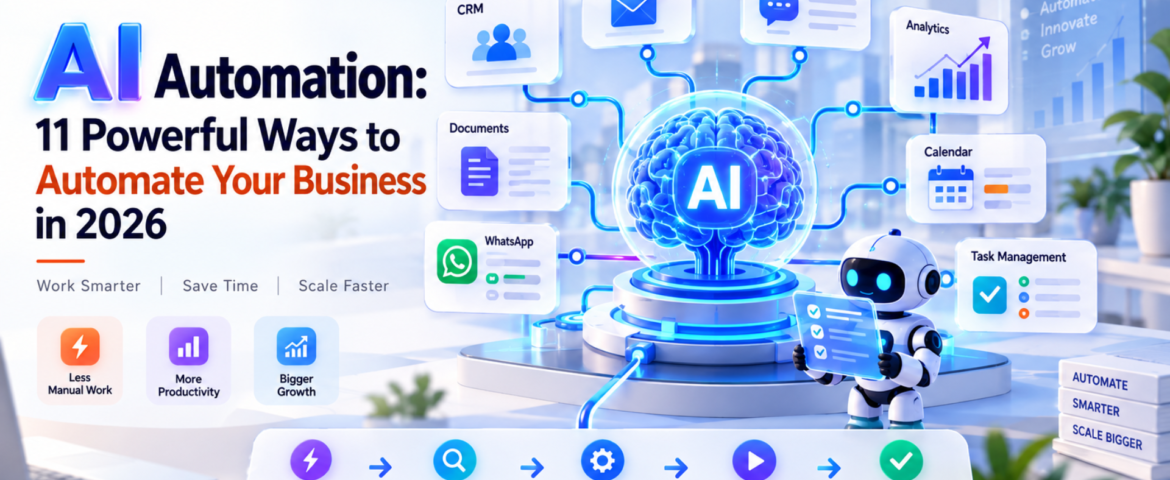
AI Automation: 11 Powerful Ways to Automate Your Business in 2026
AI Automation means using artificial intelligence to understand information, make decisions, and complete repetitive business tasks with little or no manual effort. For beginners, freelancers, and small business owners, it can automate everything from lead follow-ups and customer support to reporting, scheduling, and data entry.
The important point is this: AI automation is not about replacing every person with AI. It is about removing repetitive work so people can focus on work that actually needs human judgment.
In 2026, businesses are moving beyond simple chatbots toward AI-powered workflows and agents that can perform multiple steps inside a business process. Google Cloud’s 2026 AI Agent Trends report, for example, identifies agentic workflows as an important direction for business automation.
In simple words: AI automation lets you tell a system what needs to happen, and the system handles much of the work for you.
Table of Contents
- What Is AI Automation?
- How Does AI Automation Work?
- What Are the Best AI Automation Use Cases?
- How Can Small Businesses Use AI Automation?
- How Can Freelancers Use AI Automation?
- What Is the Difference Between AI Automation and Traditional Automation?
- What Are the Best AI Automation Tools?
- How Do You Start With AI Automation?
- What Are the Benefits of AI Automation?
- What Are the Risks of AI Automation?
- What Mistakes Should You Avoid?
- Is AI Automation Worth It in 2026?
- Frequently Asked Questions
What Is AI Automation?
AI automation is the use of artificial intelligence within automated workflows to understand inputs, make decisions, generate outputs, and perform actions.
Traditional automation usually follows fixed rules.
For example:
If a customer fills out a form → send an email.
AI automation can handle a more flexible situation:
A customer submits an enquiry → AI understands the enquiry → identifies the customer’s requirement → checks relevant information → creates or updates a CRM record → sends a personalized response → alerts a salesperson when human attention is needed.
That’s the major difference.
Traditional automation mostly follows predefined instructions. AI automation can interpret information and handle situations that aren’t always perfectly predictable.
What is a simple example of AI automation?
Imagine a small web-design agency receiving 30 enquiries every day.
Without automation, someone might need to:
- Read every enquiry.
- Identify the service required.
- Copy the details into a CRM.
- Send a response.
- Follow up later.
- Schedule a meeting.
With AI automation, much of this workflow can happen automatically.
The AI can understand the enquiry, categorize it, update the CRM, draft a personalized response, and trigger a follow-up sequence.
The human still controls important decisions.
How Does AI Automation Work?
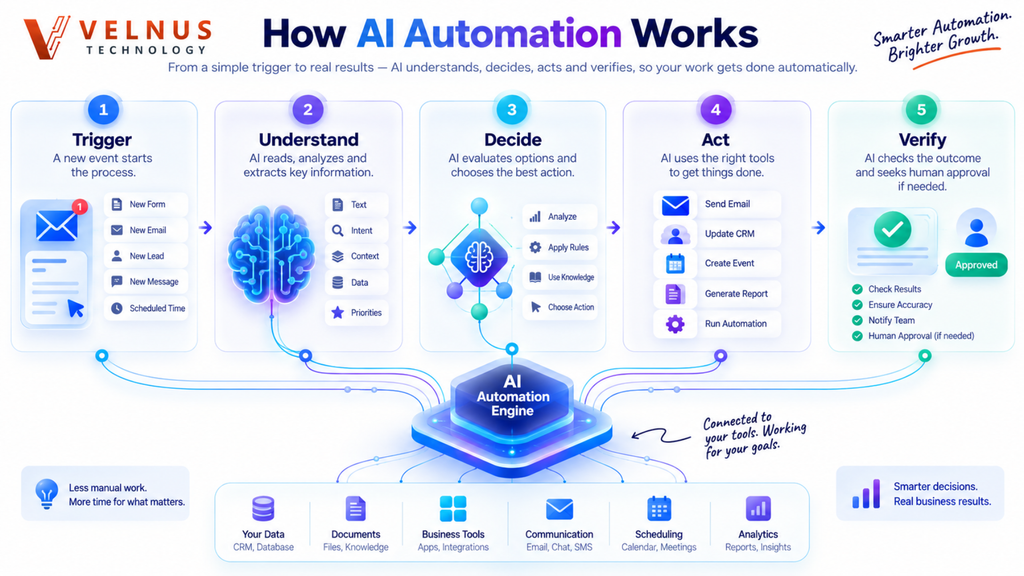
A typical AI automation workflow has five basic stages:
Trigger → Understand → Decide → Act → Verify
1. Trigger
Something starts the workflow.
Examples:
- A new website enquiry
- An email arrives
- A customer sends a WhatsApp message
- A payment is received
- A calendar event is created
- A form is submitted
2. Understand
AI processes the information.
For example, it can identify:
- Customer intent
- Sentiment
- Product requirement
- Urgency
- Important details
- Category
3. Decide
The system determines what should happen next.
For example:
“This customer wants a product demo, so create a qualified sales lead.”
4. Act
The automation performs an action.
It could:
- Send an email
- Update a CRM
- Create a task
- Schedule a meeting
- Generate a report
- Send a WhatsApp response
- Notify a team member
5. Verify
A good AI automation system shouldn’t blindly trust every AI output.
For sensitive actions, it can ask a person for approval.
This human-in-the-loop approach is especially useful for financial, legal, customer-facing, or high-risk workflows.
What Are the Best AI Automation Use Cases?
AI automation can be applied to almost any repetitive workflow. But small businesses should start with tasks that happen frequently and follow a reasonably clear process.
Here are 11 practical examples.
1. Lead Generation and Qualification
AI can read incoming enquiries and identify potential customers based on criteria such as:
- Budget
- Service requirement
- Location
- Timeline
- Company size
Instead of manually checking every lead, the sales team can focus on qualified prospects.
2. Customer Support
AI automation can answer common questions, classify support requests, find relevant information, and escalate complicated cases to a human.
For example:
Customer question → AI understands request → searches knowledge base → responds → escalates if necessary
This doesn’t mean every customer interaction should be handled by AI. Complex or sensitive issues should still have a human escalation path.
3. Email Automation
AI can classify incoming emails and decide what should happen next.
For example:
Sales enquiry → CRM
Invoice email → Finance folder
Support issue → Help desk
Meeting request → Calendar workflow
This can save small teams a surprising amount of administrative time.
4. CRM Updates
CRM data often becomes outdated because employees don’t have time to update it.
AI automation can extract information from emails, calls, forms, or messages and use it to update customer records.
This makes the CRM more useful without forcing employees to enter every detail manually.
5. Appointment Scheduling
Instead of exchanging multiple messages to find a suitable time, automation can:
- Understand the customer’s request
- Check availability
- Offer suitable times
- Create the appointment
- Send confirmation
- Trigger reminders
This is particularly useful for consultants, agencies, clinics, coaches, and service businesses.
6. Content Creation
AI automation can support a content workflow:
Topic → Research → Brief → Draft → Review → Publish
But there’s an important difference between automating content production and publishing everything generated by AI.
Human review is still valuable for:
- Accuracy
- Brand voice
- Original insights
- Experience
- Fact checking
Google’s current guidance emphasizes useful, original content rather than simply producing more AI-generated pages.
7. Social Media Workflows
AI can help transform one piece of content into multiple formats.
For example:
Blog article → LinkedIn post → Instagram caption → short video script → email newsletter
A person can then review and approve the content before publishing.
8. Invoicing and Administrative Work
AI automation can extract information from invoices, organize documents, identify missing information, and trigger reminders.
For example:
Invoice received → extract vendor + amount + date → categorize → send for approval → update accounting workflow.
Financial actions should generally have appropriate approval and security controls.
9. Weekly Business Reports
Instead of manually collecting data from multiple systems, an automation can gather information and prepare a summary.
For example:
CRM + website analytics + sales data → AI analysis → weekly business report
The owner can then spend time interpreting the results rather than assembling spreadsheets.
10. WhatsApp Customer Communication
For businesses that receive many customer enquiries through WhatsApp, AI automation can help with:
- FAQs
- Lead qualification
- Appointment requests
- Order updates
- Follow-ups
- Customer routing
The key is to connect the automation to accurate business information rather than allowing the AI to invent answers.
11. Internal Task Management
AI can turn conversations and messages into actionable tasks.
For example:
“Please prepare the proposal for ABC before Friday.”
An automation could identify the task, assign it to the correct person, set a deadline, and add it to a project-management system.
How Can Small Businesses Use AI Automation?
Small businesses don’t need to automate everything.
In fact, trying to automate the entire business at once is usually a mistake.
Start with one repetitive process.
A good starting workflow might be:
New lead → AI qualification → CRM update → personalized response → sales notification
Why start here?
Because the process is easy to measure.
You can compare:
- Response time before automation
- Response time after automation
- Number of leads processed
- Qualified leads
- Follow-up completion
- Conversion rate
Current research also shows strong interest in AI-agent adoption among SMBs, although businesses are still working through implementation challenges and measuring the actual productivity gains.
How Can Freelancers Use AI Automation?
Freelancers often lose time not because of their core work, but because of administrative tasks.
AI automation can help with:
- Client onboarding
- Proposal creation
- Email sorting
- Meeting summaries
- Follow-ups
- Invoice reminders
- Content repurposing
- Project updates
- Lead qualification
For example, a freelance designer could create this workflow:
Website enquiry → AI understands project → collects missing details → creates client record → sends onboarding email → schedules consultation
Instead of spending 30 minutes handling every new enquiry, the freelancer can focus on the actual client work.
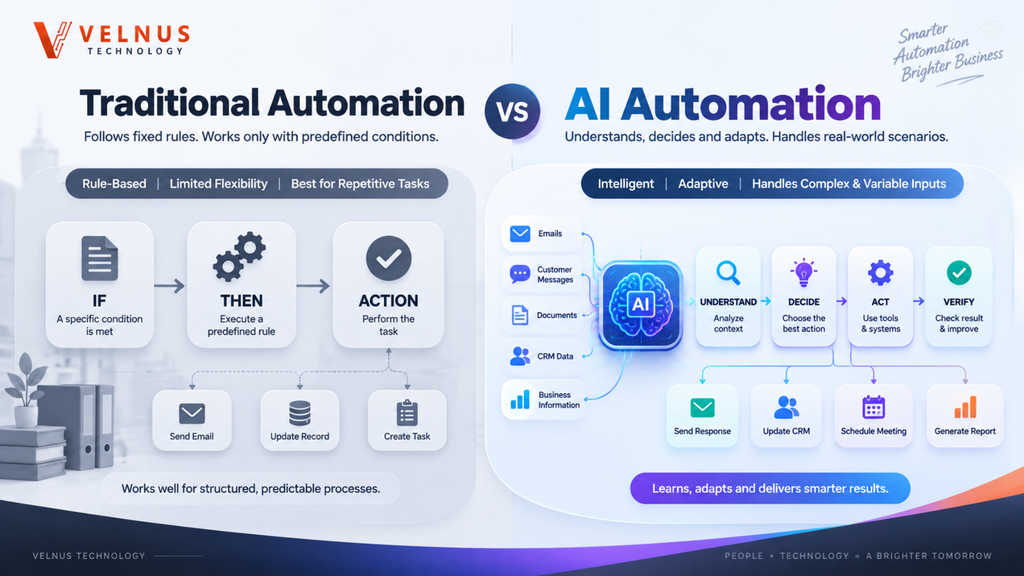
What Is the Difference Between AI Automation and Traditional Automation?
| Traditional Automation | AI Automation |
|---|---|
| Mostly rule-based | Can interpret information |
| Predictable inputs | Handles more varied inputs |
| Uses fixed conditions | Can use AI reasoning or classification |
| “If X, do Y” | Understands context before acting |
| Best for repetitive structured tasks | Useful for structured + language-heavy tasks |
| Limited flexibility | More adaptable |
A useful way to think about it is:
Traditional automation follows instructions. AI automation can interpret instructions and information before taking action.
AI agents take this idea further by allowing systems to pursue a goal through multiple steps and tools. Google Cloud describes agents as systems that can understand a goal, develop a multi-step plan, and take actions under human guidance and oversight.
What Are the Best AI Automation Tools?
There isn’t one “best” AI automation tool for every business.
Your choice depends on the workflow.
Popular categories include:
- Workflow platforms: Zapier, Make, n8n
- AI assistants: ChatGPT, Gemini
- CRM automation: HubSpot, Salesforce
- Communication: WhatsApp Business integrations, email platforms
- Data and productivity: Google Workspace, Microsoft 365
- Custom automation: APIs and AI models
The important question isn’t:
“Which AI tool is trending?”
Instead ask:
“Which repetitive business process am I trying to improve?”
Then choose the simplest tool that can reliably solve it.
How Do You Start With AI Automation?
Follow this six-step process.
Step 1: List repetitive tasks
Write down everything you or your team repeatedly do during the week.
Step 2: Identify the biggest time drain
Don’t choose a task simply because it sounds exciting.
Choose something that is:
- Frequent
- Repetitive
- Measurable
- Time-consuming
Step 3: Map the workflow
Write:
Trigger → Input → Decision → Action → Result
If you can’t explain the workflow clearly, don’t automate it yet.
Step 4: Choose the simplest solution
You might only need:
- One AI tool
- One automation platform
- One CRM integration
Don’t build a complicated system when a simple workflow can solve the problem.
Step 5: Add human approval
For important actions, create a checkpoint.
For example:
AI creates proposal → human reviews → proposal is sent
Step 6: Measure the result
Track:
- Time saved
- Cost
- Error rate
- Response time
- Revenue impact
- Customer satisfaction
This turns AI automation from a technology experiment into a business decision.
What Are the Benefits of AI Automation?
The biggest benefits include:
Save time
Repetitive tasks can happen automatically instead of requiring manual effort.
Respond faster
Automated systems can process enquiries outside normal working hours.
Reduce repetitive work
Employees can spend less time copying, sorting, and transferring information.
Improve consistency
Standard workflows can reduce missed steps.
Scale operations
A small team can handle more work without increasing headcount at the same rate.
Improve customer experience
Faster responses and smoother workflows can make interactions easier for customers.
However, don’t assume automation automatically produces huge savings. The result depends on the workflow, implementation quality, data, and how much human intervention remains.
What Are the Risks of AI Automation?
AI automation is powerful, but it isn’t magic.
Common risks include:
- Incorrect AI outputs
- Data privacy problems
- Security vulnerabilities
- Poor-quality business data
- Over-automation
- Unexpected actions
- Lack of human oversight
- Integration failures
For this reason, businesses should define what an AI system is allowed to do.
A useful rule is:
The more expensive or irreversible the action, the stronger the human approval requirement should be.
For example, automatically categorizing an email is low risk.
Automatically transferring money is much higher risk.
India’s current work around authenticated AI agents for UPI payments illustrates why identity, authorization, and governance become increasingly important as AI systems gain the ability to take real-world actions.
What Mistakes Should You Avoid?
Mistake 1: Automating a broken process
AI cannot fix a workflow that doesn’t make sense.
Fix the process first.
Mistake 2: Automating everything
Not every task needs AI.
Some tasks are faster when a person simply does them.
Mistake 3: Ignoring data quality
Bad data produces bad automation.
Mistake 4: Removing human oversight
Important decisions should have appropriate review mechanisms.
Mistake 5: Measuring only time saved
Time is important, but also measure:
Revenue + quality + customer experience + errors + operating cost.
Mistake 6: Choosing tools before identifying the problem
Don’t start with:
“I want to use AI.”
Start with:
“I want to reduce this particular business problem.”
Is AI Automation Worth It in 2026?
Yes, but only when you automate the right workflow.
The biggest opportunity isn’t replacing an entire business with AI.
It’s identifying small processes that consume time every day and improving them one by one.
For a freelancer, that could mean automating client onboarding.
For a small e-commerce business, it could mean customer support and order updates.
For an agency, it could mean lead qualification and CRM updates.
For a SaaS company, it could mean support triage, reporting, or internal operations.
The broader trend is moving toward AI systems that don’t simply generate information but participate in business workflows. Google Cloud’s 2026 research highlights this transition toward multi-step agentic workflows, while current SMB research shows businesses are actively experimenting with AI agents across functions.
The smartest approach is not “AI everywhere.” It’s “AI where it creates measurable value.”
Also Read : Model Context Protocol: Powerful Beginner’s Guide to MCP in 2026
Final Takeaway
AI Automation is not about making your business more complicated. It’s about making repetitive work simpler.
Start with one workflow.
Find the task that consumes the most repetitive time, map the process, choose a simple automation, add human approval where necessary, and measure the result.
Once that workflow works reliably, move to the next one.
That’s how beginners, freelancers, and small businesses can turn AI from a trendy technology into a practical business advantage.
Frequently Asked Questions About AI Automation
What is AI automation?
AI automation combines artificial intelligence with automated workflows to understand information, make decisions, and perform tasks with reduced human intervention.
What is an example of AI automation?
A common example is lead automation. When a customer submits a form, AI can understand the enquiry, qualify the lead, update a CRM, send a response, and notify a salesperson.
Is AI automation difficult to learn?
Basic AI automation can be learned without programming. Many no-code platforms allow users to connect applications and create workflows using visual interfaces.
How can small businesses use AI automation?
Small businesses can automate customer support, lead follow-ups, appointment scheduling, CRM updates, email processing, reporting, invoicing workflows, and content repurposing.
What is the difference between AI and automation?
AI focuses on tasks such as understanding, generating, classifying, or predicting. Automation focuses on executing predefined processes. AI automation combines both capabilities.
What is the difference between AI automation and AI agents?
AI automation generally connects AI capabilities to a workflow. An AI agent can go further by pursuing a goal, choosing actions, using tools, and completing multiple steps with appropriate oversight.
Can freelancers use AI automation?
Yes. Freelancers can automate lead management, client onboarding, proposals, meeting summaries, follow-ups, project updates, and administrative work.
Is AI automation safe?
It can be, provided the workflow has appropriate permissions, data protection, testing, monitoring, and human approval for sensitive actions.
Will AI automation replace jobs?
AI automation is more likely to change many tasks within jobs than simply eliminate every job. People who learn to work with AI and redesign workflows can use automation as a productivity advantage.
How much does AI automation cost?
The cost depends on the tools, number of workflows, integrations, AI usage, and complexity. A simple workflow can be inexpensive, while custom business automation can require development and ongoing maintenance.
Leave A Comment