
- Mail Address info@velnustech.com
- Phone Number +91-90990-05498

Contact Info
- C-1024, Siddhivinayak Tower, Kataria Automobile Road Makarba, Ahmedabad - 380051
- +91 90990 05498
- info@velnustech.com
- Week Days: 09.00 to 18.00 Sunday: Closed
What Is n8n? A Complete Beginner’s Guide To Workflow Automation
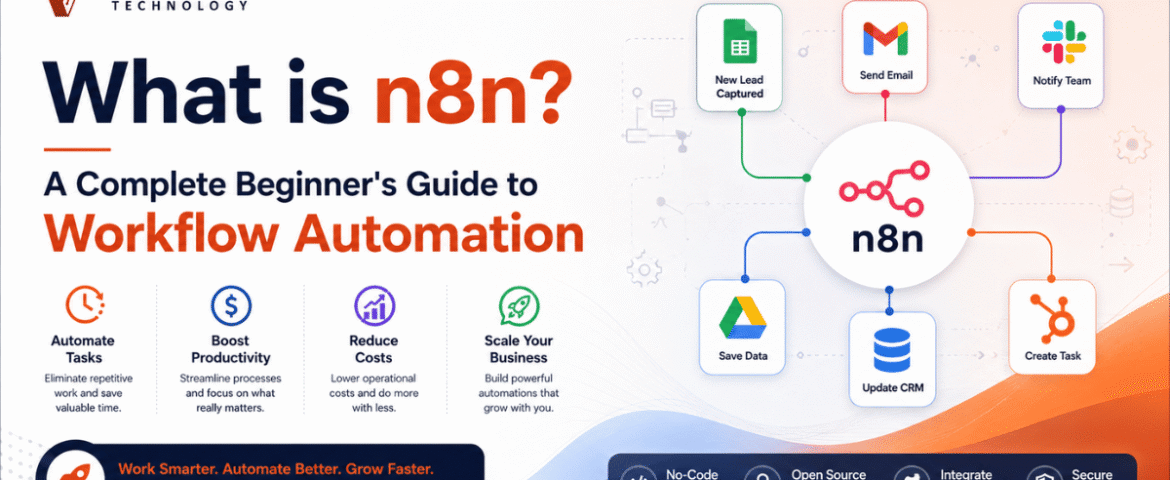
Businesses and individuals spend countless hours performing repetitive digital tasks every day. Copying data between applications, sending emails, updating spreadsheets, managing customer information, posting on social media, and organizing files are just a few examples of routine work that consumes valuable time. Workflow automation solves this problem by allowing software to perform repetitive tasks automatically.
One of the fastest-growing workflow automation platforms is n8n. It enables users to connect multiple applications, automate processes, and build complex workflows with minimal manual effort. Whether you are a beginner exploring automation or a developer looking for advanced customization, n8n provides the flexibility to automate almost any digital process.
Unlike many automation platforms that restrict customization, n8n offers a visual workflow builder combined with the ability to write custom code whenever needed. This makes it suitable for beginners who prefer drag-and-drop automation as well as professionals who require advanced logic.
This beginner’s guide explains everything you need to know about n8n, including its features, benefits, use cases, workflow creation process, integrations, AI capabilities, and best practices.
What is n8n?
n8n is a workflow automation platform that connects different applications and services to automate repetitive tasks. Instead of manually transferring information between multiple systems, users can create workflows that execute automatically based on predefined conditions.
A workflow consists of connected steps called nodes. Each node performs a specific task such as:
- Receiving data
- Processing information
- Sending notifications
- Updating databases
- Calling APIs
- Creating files
- Triggering another workflow
The platform provides a visual interface where workflows are created by connecting these nodes together.
One of n8n’s biggest strengths is its flexibility. Simple workflows can be built without coding, while advanced users can extend workflows using JavaScript, APIs, expressions, and custom logic.
Why Workflow Automation Matters
Modern businesses use dozens of digital tools every day. Managing them manually often results in:
Time-consuming repetitive work
Employees waste hours copying information between systems.
Increased human errors
Manual data entry increases the possibility of mistakes.
Slow response times
Customers expect instant communication and quick processing.
Poor productivity
Staff spend less time on meaningful work and more time on repetitive tasks.
Workflow automation solves these challenges by creating reliable, repeatable, and scalable processes.
How Does n8n Work?
n8n works by connecting applications through workflows.
A typical workflow follows these steps:
Trigger
The workflow starts when an event occurs.
Examples include:
- Form submission
- New email
- Scheduled time
- New database record
- API request
- Webhook
- File upload
Process Data
After receiving information, n8n processes the data.
This may include:
- Filtering
- Sorting
- Formatting
- Removing duplicates
- Validating information
- Performing calculations
Execute Actions
The workflow performs one or more actions.
Examples include:
- Send email
- Create spreadsheet row
- Update CRM
- Generate PDF
- Send Slack notification
- Create task
- Store files
End Workflow
The workflow finishes after completing all configured actions.
Key Features of n8n
Visual Workflow Builder
The drag-and-drop interface allows users to build workflows without writing large amounts of code.
Each node represents one action, making workflows easy to understand.
Large Integration Library
n8n supports hundreds of integrations with popular services including:
- Google Sheets
- Gmail
- Slack
- Discord
- Trello
- Notion
- Airtable
- GitHub
- PostgreSQL
- MySQL
- OpenAI
- Telegram
It also supports any REST API.
Custom Code Support
Developers can use JavaScript to:
- Transform data
- Build custom logic
- Process arrays
- Call APIs
- Create advanced conditions
This provides unlimited flexibility.
Webhook Support
Webhooks allow applications to instantly trigger workflows whenever an event occurs.
This enables real-time automation.
Scheduling
Workflows can run:
- Every minute
- Hourly
- Daily
- Weekly
- Monthly
- At custom intervals
Perfect for reports, backups, and recurring tasks.
Conditional Logic
Users can create intelligent workflows using conditions.
For example:
- If customer exists
- If payment succeeded
- If order value exceeds a limit
- If email contains attachments
Different actions can execute based on these conditions.
Error Handling
n8n includes features for:
- Retry failed executions
- Error notifications
- Logging
- Monitoring
- Recovery workflows
This improves workflow reliability.
Benefits of Using n8n
Saves Time
Automation eliminates repetitive manual work.
Reduces Errors
Automated workflows execute consistently without typing mistakes.
Improves Productivity
Teams focus on important tasks instead of routine operations.
Scalable Automation
As workloads increase, workflows continue running automatically.
Flexible Development
Suitable for beginners and developers alike.
Cost-Effective
Users can automate complex business processes without expensive custom software.
Common Use Cases
Lead Management
Automatically:
- Capture leads
- Validate information
- Save to CRM
- Send welcome email
- Notify sales team
Email Automation
Automatically:
- Send confirmations
- Follow-up emails
- Reminders
- Reports
- Notifications
Social Media Automation
Schedule and publish content automatically.
Examples include:
- Facebook posts
- LinkedIn updates
- Twitter posts
- Instagram publishing
Customer Support
Automate:
- Ticket creation
- Notifications
- Status updates
- Customer responses
Data Synchronization
Keep multiple applications synchronized.
For example:
- CRM
- Spreadsheet
- Database
- Marketing platform
File Management
Automatically:
- Rename files
- Move folders
- Backup documents
- Compress files
- Generate reports
AI Automation
Integrate AI services to:
- Summarize text
- Generate content
- Translate languages
- Analyze customer messages
- Classify data
Understanding Nodes in n8n
Nodes are the building blocks of every workflow.
Trigger Nodes
Start workflows.
Examples:
- Webhook
- Cron
- Manual Trigger
- Email Trigger
Action Nodes
Perform tasks.
Examples:
- Send Email
- Update Database
- HTTP Request
- Slack Message
Logic Nodes
Control workflow behavior.
Examples:
- IF
- Switch
- Merge
- Wait
- Loop
Data Nodes
Transform information.
Examples:
- Edit Fields
- Code
- Set
- Aggregate
Creating Your First Workflow
Step 1
Create a new workflow.
Step 2
Add a trigger.
Example:
Manual Trigger
Step 3
Connect another node.
Example:
Google Sheets
Step 4
Configure credentials.
Step 5
Choose the desired action.
Step 6
Test the workflow.
Step 7
Activate the workflow.
Once activated, it will run automatically whenever the trigger occurs.
Popular n8n Integrations
Some commonly used integrations include:
Productivity
- Google Drive
- Google Calendar
- Google Docs
- Microsoft Outlook
Communication
- Slack
- Telegram
- Discord
- Gmail
Databases
- MySQL
- PostgreSQL
- MongoDB
- Redis
Marketing
- Mailchimp
- HubSpot
Development
- GitHub
- GitLab
- Docker
- Jenkins
Cloud Storage
- Dropbox
- OneDrive
- AWS S3
AI and n8n
Artificial Intelligence has become an important part of workflow automation.
n8n allows users to combine AI with automation to create intelligent workflows.
Examples include:
AI Content Generation
Generate:
- Articles
- Emails
- Product descriptions
- Blog ideas
AI Chatbots
Create automated conversations with customers.
Document Processing
Automatically:
- Read PDFs
- Extract text
- Summarize documents
- Organize files
Customer Sentiment Analysis
Analyze customer messages and classify them as:
- Positive
- Neutral
- Negative
Data Classification
Automatically organize large datasets using AI.
Best Practices for Beginners
Start Small
Build simple workflows before creating advanced automations.
Name Every Node
Clear names make workflows easier to understand.
Test Frequently
Run workflows step by step before activating them.
Handle Errors
Always create fallback paths for failed executions.
Use Variables
Avoid hardcoding values whenever possible.
Organize Workflows
Group related workflows into logical folders or projects.
Monitor Executions
Regularly review execution history to identify issues.
Common Beginner Mistakes
Overcomplicating Workflows
Keep workflows simple.
Ignoring Error Handling
Always prepare for unexpected failures.
Not Testing
Test every workflow before deploying it.
Poor Documentation
Document workflow logic for future maintenance.
Forgetting Security
Protect credentials and sensitive data.
Future of Workflow Automation
Workflow automation continues to evolve rapidly with artificial intelligence, machine learning, and cloud computing.
Future automation trends include:
- AI-powered decision making
- Intelligent document processing
- Predictive workflows
- Voice-based automation
- Hyperautomation
- Low-code development
- Robotic process automation integration
- Real-time analytics
- Smarter API integrations
- Autonomous business workflows
As organizations continue adopting digital transformation, workflow automation platforms like n8n will become increasingly important for improving efficiency and reducing manual work.
Also Read : WhatsApp Chat Automation: The Complete Guide to Smarter Customer Communication
Conclusion
n8n is a powerful and flexible workflow automation platform that helps automate repetitive digital tasks across multiple applications. Its visual workflow builder, extensive integrations, custom code support, AI capabilities, and scalable architecture make it suitable for beginners and experienced users alike.
Whether you want to automate emails, synchronize databases, manage leads, process documents, or build advanced AI-powered workflows, n8n provides the tools needed to create efficient and reliable automation. By starting with simple workflows and gradually exploring advanced features, users can save time, improve productivity, reduce manual errors, and streamline daily operations. As automation becomes an essential part of modern digital workflows, learning n8n is a valuable skill that can benefit individuals, teams, and businesses across various industries.
Frequently Asked Questions (FAQs)
Q1. What is n8n used for?
n8n is used to automate repetitive tasks by connecting multiple applications, APIs, databases, and online services into automated workflows.
Q2. Is n8n beginner-friendly?
Yes. Its visual drag-and-drop workflow builder allows beginners to create automations without extensive programming knowledge.
Q3. Does n8n require coding?
No. Most workflows can be built visually, but advanced users can add JavaScript for greater customization.
Q4. Can n8n connect with APIs?
Yes. It supports REST APIs, webhooks, and HTTP requests, making it possible to integrate with almost any service.
Q5. Is n8n suitable for AI automation?
Yes. It can integrate AI models to automate content generation, document processing, chatbots, data analysis, and more.
Leave A Comment