- Mail Address info@velnustech.com
- Phone Number +91-90990-05498

Contact Info
- C-1024, Siddhivinayak Tower, Kataria Automobile Road Makarba, Ahmedabad - 380051
- +91 90990 05498
- info@velnustech.com
- Week Days: 09.00 to 18.00 Sunday: Closed
crm integration
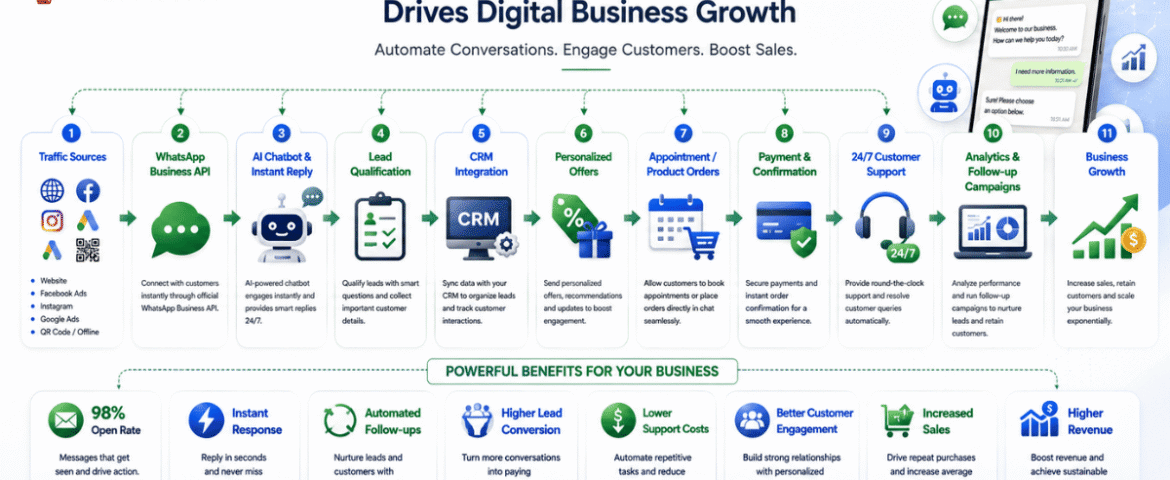
Digital Business Growth: The Power Of WhatsApp Automation
- By KHUSHI LIMBASIYA
- 1 Comment
- technology Latest News
Introduction to Modern Digital Business Growth The landscape of modern commerce is moving at an unprecedented speed. Consumers today expect instant answers, personalized recommendations, and effortless transactional experiences right at their fingertips. Traditional marketing funnels that rely heavily on static landing pages, long web forms, and email newsletters are experiencing a sharp decline in efficiency. Open rates for traditional marketing emails continue to plummet, while consumers grow tired of waiting hours—or even days—for a business to respond to a basic inquiry. To achieve sustainable Digital Business Growth, organizations must adapt to where their customers are actually spending their time. Today, that destination is instant messaging. WhatsApp has evolved from a simple personal chat app into an engine for scaling operations, capturing qualified leads, and closing sales. By replacing slow, friction-filled touchpoints with automated, conversational interactions, businesses can connect with prospects in real time. WhatsApp automation bridges the gap between passive marketing interest and immediate revenue generation, serving as a critical pillar for long-term digital expansion. Understanding WhatsApp Automation in the Digital Ecosystem What is WhatsApp Automation? WhatsApp automation is the strategic integration of software workflows, artificial intelligence, and the official WhatsApp Business API to handle customer communication without manual intervention. Rather than relying on a human team to type individual responses to every inquiry, automated systems trigger pre-designed message paths, answer complex questions, qualify leads, send promotional broadcasts, and process orders automatically. These systems do not feel like rigid, frustration-inducing phone trees. Modern messaging engines utilize conversational logic and natural language processing to deliver helpful, human-like responses within milliseconds. Moving Beyond Traditional Communication Channels Achieving meaningful Digital Business Growth requires choosing marketing channels that offer high visibility and engagement. When comparing traditional outreach methods to automated messaging, the performance gap is vast: Communication Channel Average Open Rate Average Response Time Engagement Potential Traditional Email 15% – 25% 6 to 24 Hours Low to Medium SMS Marketing 80% – 90% 1 to 2 Hours Low (Text Only) WhatsApp Automation 95% – 98% Under 90 Seconds Extremely High (Interactive/Multimodal) Because instant messaging carries an open rate approaching 98%, your promotional campaigns, product updates, and transactional alerts are almost guaranteed to be read. This direct line to the consumer eliminates the friction that typically slows down sales cycles. How WhatsApp Automation Fuels Digital Business Growth 1. Accelerating Lead Capture and Conversion Rates Speed to lead is one of the single most influential factors in determining sales success. Studies show that reaching out to a potential customer within the first five minutes of an inquiry increases the probability of conversion exponentially. Through automated entry points—such as web widgets, QR codes, or social media click-to-chat ads—a prospect can initiate a conversation with a single tap. The automated system instantly engages the lead, asks qualifying questions, and collects verified data (such as names, preferences, and intent) without forcing the user to leave the app. By removing landing page redirects and tedious forms, conversion rates increase significantly. 2. Personalization at Scale for Customer Retention True Digital Business Growth isn’t just about acquiring new users; it relies heavily on maximizing the lifetime value of existing customers. Automation allows brands to deliver deeply personalized experiences to thousands of individuals simultaneously. By syncing messaging workflows with underlying databases, automated messages can dynamically insert recipient names, reference previous purchases, send targeted replenishment reminders, or recommend complementary products. This level of tailored interaction makes customers feel recognized, building strong brand loyalty and encouraging repeat purchases. 3. Driving Revenue with In-Chat Transactions Modern messaging frameworks allow users to browse catalogs, select product variations, schedule appointments, and complete secure payments directly inside the chat interface. Removing the requirement for a customer to jump across multiple browser tabs or build external accounts keeps them inside a high-trust, comfortable environment. The fewer steps required to make a purchase, the higher your overall revenue generation will be. 4. Slashing Operational Overhead and Support Costs Scaling customer support manually is expensive. As customer bases grow, hiring larger support teams to answer repetitive questions creates high overhead costs. Automated bots can resolve up to 80% of routine customer service inquiries—such as checking order statuses, verifying store hours, or providing policy details—without human intervention. This round-the-clock availability drastically reduces support ticket volumes, enabling your existing staff to focus on high-touch, complex sales opportunities that directly impact your bottom line. High-Converting Strategies for Digital Business Growth Seamless Click-to-WhatsApp Campaign Integration One of the most scalable ways to drive paid acquisition is connecting social media advertisements directly to an automated messaging flow. Instead of sending ad traffic to a generic website where visitors might drop off, a “Click-to-WhatsApp” campaign opens a conversation immediately. When a user taps the ad, a pre-written message appears on their screen. Once they press send, the automated bot triggers an interactive greeting, presents relevant offers, and guides the prospect toward a purchasing decision in real time. Automated Cart Recovery and Re-Engagement E-commerce businesses lose billions annually to abandoned shopping carts. While email reminders often go unread in spam folders, an automated message sent via WhatsApp cuts through the noise. If a customer leaves items in their cart without completing the purchase, an automated workflow can send a friendly reminder 30 to 60 minutes later. By including high-resolution product images, a direct checkout link, or a time-sensitive discount code, businesses routinely recover 20% to 50% of abandoned orders using this single automated channel. Intelligent Chatbot Flows and Zero-Party Data Collection Privacy regulations and changing browser standards have made third-party tracking cookies unreliable. As a result, gathering zero-party data—data that a customer explicitly and voluntarily shares with a brand—is critical for Digital Business Growth. Interactive chat flows allow you to ask targeted, conversational questions: By gamifying the qualification process with interactive buttons and quick replies, customers willingly share their preferences. This data can be immediately stored and used to segment your audience for highly targeted future marketing campaigns. Scaling Your Operations with Velnus Technology Building a reliable, secure, and enterprise-ready messaging architecture requires dedicated technical expertise. This is
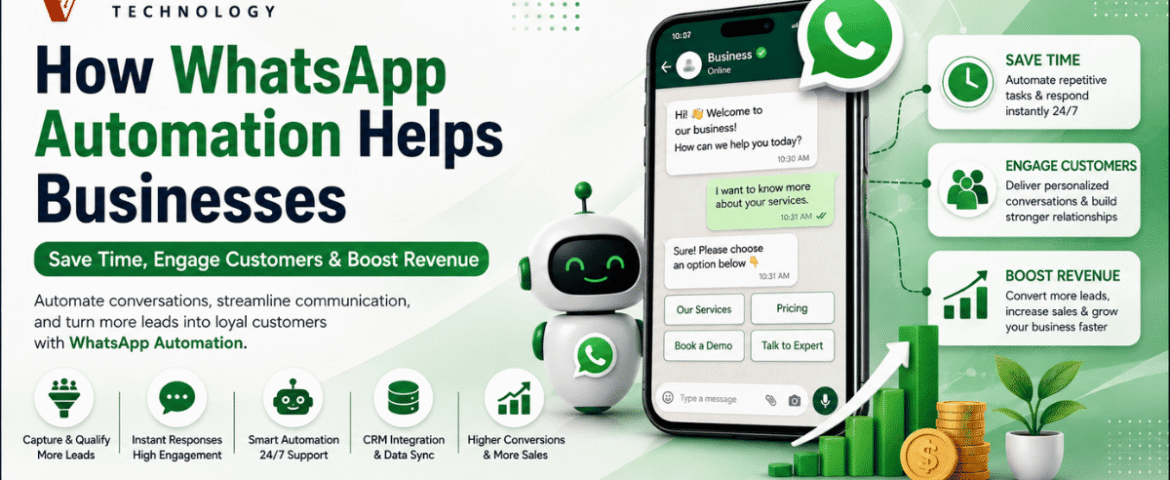
How WhatsApp Automation Helps Businesses Save Time, Engage Customers & Boost Revenue
- By KHUSHI LIMBASIYA
- 0 Comments
- Latest News technology
Introduction to the Power of WhatsApp Automation In the modern digital economy, the speed and quality of customer communication can dictate the success or failure of a business. As traditional channels like email and phone calls become increasingly saturated, businesses are looking for more direct and effective ways to connect with their audiences. With over 3 billion people globally checking the app multiple times a day, WhatsApp has emerged as the premier platform for customer interaction. However, managing a massive influx of messages manually is impossible for growing teams. This is where WhatsApp automation becomes an essential strategy. WhatsApp automation involves utilizing intelligent workflows, chatbots, and application programming interfaces (APIs) to handle conversations and send messages without requiring manual human intervention. Rather than being simple auto-responders, these systems provide smart, context-aware interactions that closely mimic human responses, allowing a business to scale its customer service seamlessly. By integrating WhatsApp automation, organizations can fundamentally transform their operations, significantly reducing manual effort while maximizing engagement and sales. The Shift from Traditional Channels to Messaging For years, businesses relied heavily on email marketing and standard customer service desks. Unfortunately, email campaigns today often struggle, typically yielding open rates of only around 20 percent and minimal click-through rates of 2 to 5 percent. Consumers are fatigued by cluttered inboxes and delayed email responses. In stark contrast, WhatsApp campaigns achieve staggering open rates of 98 percent. Furthermore, click-through rates on automated WhatsApp messages range between 45 and 60 percent. This massive disparity exists because WhatsApp feels inherently personal, immediate, and conversational to the user. When a business leverages WhatsApp automation, they are placing their brand directly into an environment that customers already trust and check constantly. How WhatsApp Automation Saves Time and Resources One of the most immediate and measurable impacts of implementing WhatsApp automation is the sheer amount of time and effort it saves for internal teams. By automating routine interactions, businesses can reallocate their human resources to more complex, strategic tasks. Providing True 24/7 Customer Support Customers do not only browse products or experience issues during standard business hours. Decision-makers and consumers alike frequently research solutions late at night or on weekends. Most businesses simply cannot afford the overhead of maintaining a 24/7 human support team. WhatsApp automation solves this by keeping your business available around the clock. Automated responses ensure that no inquiry goes unanswered, regardless of the time of day. Whether a customer is asking for a product catalog at midnight or requesting an appointment early Sunday morning, the automated system can acknowledge the request, provide the necessary information, or confirm a future meeting instantly. One sports facility that implemented such automation saved significant capital by avoiding the cost of hiring two full-time employees for off-hour shifts, all while providing continuous support. Resolving Common Queries Instantly A significant portion of incoming customer messages consists of repetitive, frequently asked questions (FAQs). Handling these manually creates bottlenecks and frustrates both customers and staff. By deploying AI-driven chatbots to handle the bulk of basic inquiries, businesses report that their response times improve drastically, sometimes by as much as 90 to 97 percent. This immediate resolution keeps the customer satisfied and allows live agents to dedicate their time to high-value, complex problem-solving. Streamlining Internal Workflows Beyond customer-facing interactions, WhatsApp automation can also be utilized for internal communications and operational workflows. Boosting Customer Engagement with WhatsApp Engagement is the lifeblood of customer retention and brand loyalty. Because WhatsApp is a platform that consumers actively monitor, businesses leveraging automation can achieve unprecedented levels of interaction. Leveraging Unmatched Visibility When you send an automated message via email, it may sit unread for days. When you send it via WhatsApp, it is almost guaranteed to be seen immediately. WhatsApp automation ensures that campaigns, from simple birthday greetings to localized promotions, enjoy exceptional visibility. This directness makes the platform ideal for quickly raising brand awareness and ensuring critical marketing messages are actually consumed by the target audience. Personalization at Scale A common misconception about automation is that it feels cold and robotic. However, modern WhatsApp automation can be highly personalized and contextually relevant, which actively builds customer trust. By integrating WhatsApp automation with your CRM platform, the system can dynamically pull specific customer data—such as their name, previous order history, or preferences—into the automated messages. Nurturing Leads Automatically A slow reply can quickly cost a business a valuable deal. Many potential sales are lost simply because leads are not nurtured quickly or consistently enough. WhatsApp automation ensures that no opportunity slips through the cracks by deploying automated follow-ups and continuous lead nurturing sequences. If a prospect abandons a booking or leaves a conversation, an automated message can gently nudge them to continue. Automated systems can even run interactive quizzes or chatbot flows to naturally qualify prospects and segment them before passing them to a human sales representative. Businesses utilizing automated follow-ups report seeing engagement levels 20 percent higher than when relying solely on manual follow-ups. Driving Revenue Growth Through WhatsApp Automation Ultimately, the goal of saving time and engaging customers is to drive bottom-line revenue. WhatsApp automation directly contributes to sales growth through several powerful mechanisms. Recovering Abandoned Carts In the e-commerce sector, shopping cart abandonment is a massive source of lost revenue. Customers frequently add items to their digital carts but leave the site before checking out. Upselling and Cross-Selling Strategies Once a customer is engaged, automated systems can actively recommend complementary products or upgrades. Utilizing AI suggestions for upselling and cross-selling through WhatsApp can boost a business’s average order value by 25 to 35 percent. Additionally, features like in-chat payments allow customers to complete their purchases directly within the messaging interface via one-click checkout links, drastically reducing purchase friction and accelerating the sales cycle. Lowering Customer Acquisition and Support Costs Revenue growth is not just about making more sales; it is also about reducing operational expenses. By successfully implementing these automated workflows, businesses globally are saving vast amounts of capital, freeing up resources for innovation and expansion.
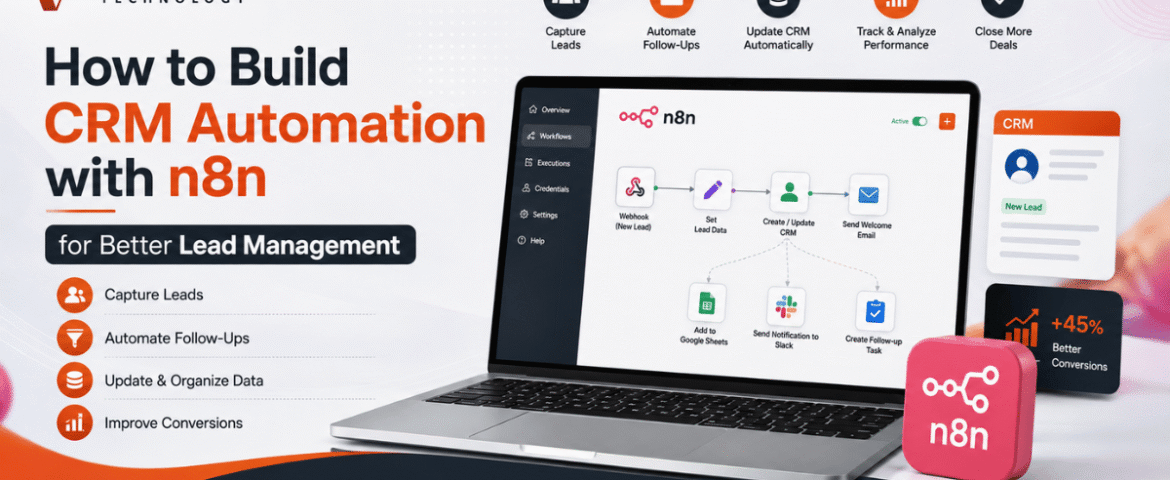
How to Build CRM Automation with n8n for Better Lead Management
- By KHUSHI LIMBASIYA
- 0 Comments
- technology Latest News
Generating and managing leads manually is one of the biggest challenges for growing businesses. As the number of inquiries increases, manually updating customer records, assigning follow-ups, and sending emails becomes time-consuming and prone to errors. This is where CRM Automation becomes a game changer. With n8n, businesses can automate repetitive CRM tasks without relying on expensive enterprise software or complex coding. Whether leads come from contact forms, social media campaigns, WhatsApp, Google Sheets, landing pages, or email, n8n can connect multiple platforms and automatically manage every step of the lead lifecycle. In this guide, you’ll learn how to build CRM Automation with n8n, create automated lead management workflows, improve response times, reduce manual work, and increase conversion rates. Why CRM Automation Matters Every business receives leads from different sources. Without automation, teams often face problems such as: CRM Automation removes these issues by automatically capturing, organizing, qualifying, and tracking leads. Some major advantages include: What is n8n? n8n is an open-source workflow automation platform that allows users to connect applications through visual workflows. Instead of writing lengthy code, users create automation using drag-and-drop nodes. n8n supports hundreds of integrations including: Its flexibility makes it one of the most powerful automation tools for CRM Automation. Why Use n8n for CRM Automation? Unlike traditional automation platforms, n8n provides complete workflow customization. Benefits include: No-Code and Low-Code Automation Business users can create workflows visually without programming knowledge. Multiple Integrations Connect multiple lead sources into one workflow. Self-Hosted Option Maintain full control over customer data. Advanced Logic Use conditions, loops, filters, delays, and custom scripts. Cost-Effective Reduce software expenses while building powerful automation. Essential Components of CRM Automation A complete CRM Automation workflow usually contains several stages. Lead Capture Collect leads from: Lead Validation Automatically verify: Lead Qualification Assign scores based on: Lead Assignment Automatically assign qualified leads to sales representatives. Follow-Up Automation Trigger: Activity Tracking Log every interaction inside the CRM automatically. Step 1: Connect Your Lead Sources The first workflow starts with lead collection. Common lead sources include: Website Contact Forms Whenever someone submits a form, n8n instantly receives the information. Collected information may include: Landing Pages Automatically push landing page submissions into your CRM. Social Media Leads Capture leads generated through advertising campaigns without manual downloads. WhatsApp Collect customer details directly from incoming conversations. Google Sheets Automatically monitor new spreadsheet entries. Step 2: Clean and Validate Lead Data Poor-quality data reduces CRM performance. n8n can automatically: Remove Duplicate Leads Search the CRM before adding new contacts. Verify Email Addresses Ensure emails follow valid formats. Format Phone Numbers Standardize country codes and mobile numbers. Normalize Customer Data Convert names into consistent formats. Example: Instead of: john smith The workflow stores: John Smith Step 3: Automatically Create CRM Records After validation, n8n creates new customer records. Each CRM entry may include: Everything happens automatically. Step 4: Lead Scoring Automation Not every lead has equal value. CRM Automation can assign scores using conditions. Example scoring: Total score determines priority. High-value leads receive immediate attention. Step 5: Assign Leads Automatically Instead of manually distributing leads, n8n can assign them based on rules. Examples: Round Robin Assignment Each sales member receives leads equally. Region-Based Assignment Assign according to customer location. Product-Based Assignment Different products go to different teams. Industry-Based Assignment Healthcare, retail, manufacturing, education, and technology leads go to specialists. Step 6: Trigger Instant Customer Responses Customers expect quick replies. CRM Automation allows immediate communication. Possible actions: Instant responses improve customer satisfaction. Step 7: Notify Sales Teams Sales teams receive instant alerts whenever new leads arrive. Notifications may be sent through: Notifications contain: Step 8: Schedule Follow-Up Activities Follow-ups are critical for lead conversion. n8n can automatically: No opportunity gets forgotten. Step 9: Update Lead Status Automatically Every interaction updates the CRM. Status examples: Sales pipelines remain accurate without manual updates. Step 10: Generate Reports Automatically CRM Automation can generate reports including: Daily Lead Reports Monitor new inquiries. Weekly Performance Reports Evaluate sales productivity. Conversion Reports Measure lead-to-customer ratio. Source Analysis Identify top-performing lead sources. Sales Pipeline Reports Understand deal progress. Reports can be emailed automatically. Popular n8n CRM Automation Workflows Website Form to CRM Automatically collect website inquiries and create CRM records. Google Sheets to CRM Import spreadsheet leads instantly. Email to CRM Convert incoming inquiries into customer records. WhatsApp to CRM Store conversations and customer details automatically. CRM to Email Marketing Send targeted campaigns based on CRM data. CRM to Calendar Schedule meetings automatically. CRM Reminder Workflow Send reminders before follow-up dates. Best Practices for CRM Automation Keep Workflows Simple Begin with basic automations before adding advanced logic. Eliminate Duplicate Records Prevent duplicate customers from entering the CRM. Use Lead Scoring Prioritize high-value opportunities. Maintain Data Quality Validate every incoming lead. Monitor Workflow Performance Regularly review execution logs. Secure Customer Information Use secure authentication and encrypted connections. Test Before Deployment Verify every workflow with sample data. Common CRM Automation Mistakes Avoid these mistakes: Overcomplicated Workflows Complex automation becomes difficult to maintain. Ignoring Error Handling Always create backup paths for failures. Missing Notifications Ensure failed workflows generate alerts. Poor Data Validation Invalid customer information reduces CRM accuracy. No Workflow Documentation Document automation logic for future updates. Advanced CRM Automation Ideas Once the basic workflow is running, additional automation can include: Benefits of CRM Automation with n8n Businesses using CRM Automation experience several long-term benefits. These include: Automation allows teams to spend more time building customer relationships instead of performing repetitive administrative tasks. Also Read : AI Workflow Automation with n8n: Build Smarter Business Processes Conclusion CRM Automation with n8n transforms the way businesses capture, organize, and manage leads. Instead of manually updating records, assigning leads, and sending follow-up messages, every process can run automatically through intelligent workflows. From lead collection and validation to scoring, assignment, notifications, reporting, and customer communication, n8n helps streamline the entire sales pipeline. As your business grows, automated workflows ensure consistency, improve efficiency, reduce errors, and enable faster responses that lead to higher conversion rates. By implementing CRM Automation with